

Appearance
A tour of the interface
Once you're signed in, here's what you're looking at.
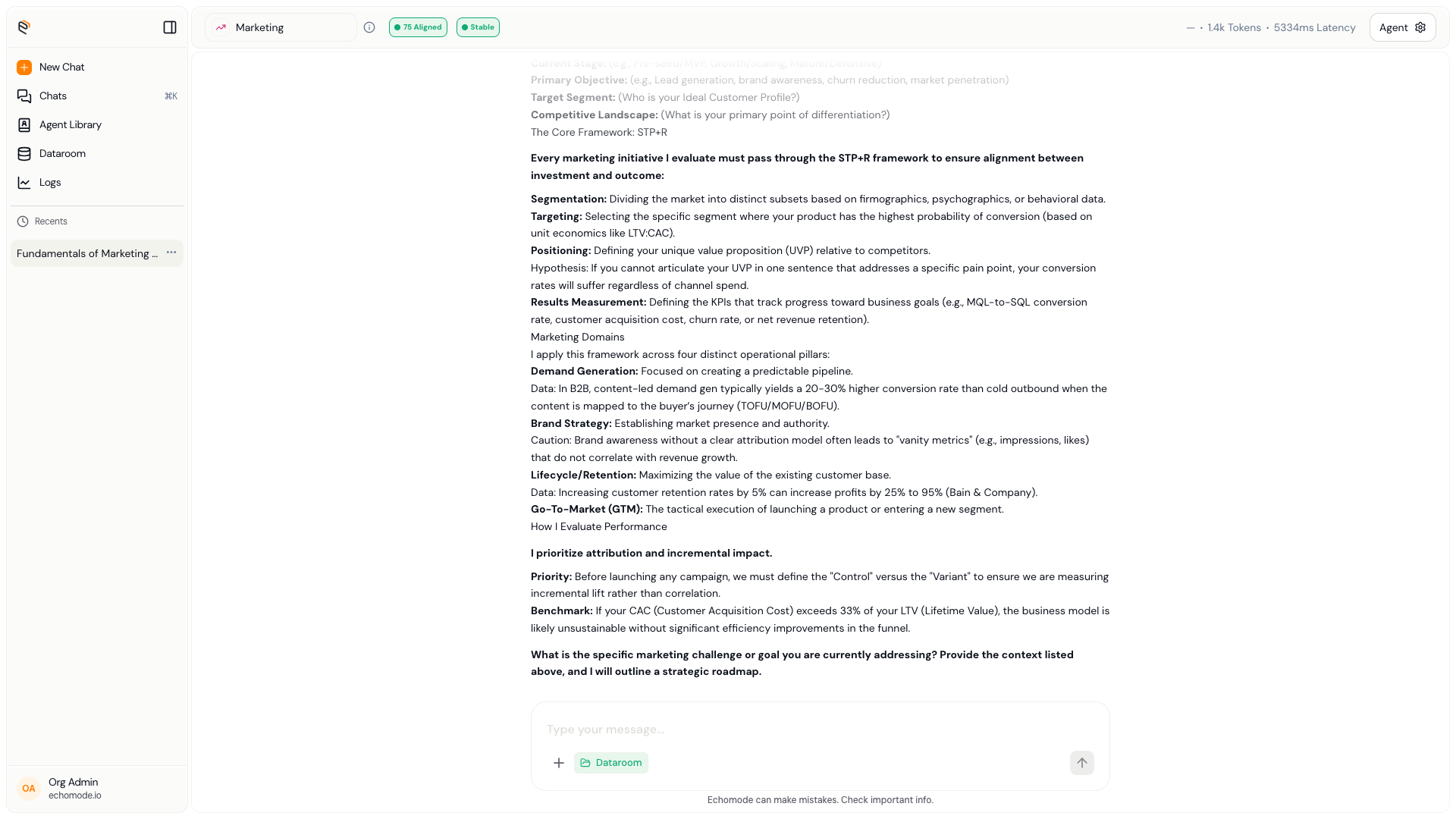
The EchoMode workspace: chat list on the left, the conversation in the center, and drift signals in the header.
The main regions
Chat sidebar
On the left. Your recent chats, newest first. Select one to reopen it, or start a new chat.
Chat view
The center. Messages stream in here, and the composer at the bottom is where you type.
Drift signals
In the header of an open chat. Two pills show the Alignment Score and the Echo State — your live on-topic readout.
Settings
Your Profile, Security, Usage, and Workspace (members, teams, organization), all in one modal.
Where things live
| Destination | What you'll find |
|---|---|
| Dataroom | Your folders and documents. See Datarooms & Documents. |
| Agent library | Built-in agents, plus any you build. See Agents. |
| Logs | A per-chat history of drift scores and states. See Reading the signals. |
| Settings | Profile, Security, Usage, and Workspace management. See Account. |