

Appearance
How search works
In EchoMode, your dataroom documents are your knowledge base — there's no separate screen to manage. When you want the assistant to answer from your documents, you bring them into the chat.
Add documents to a chat
Open the composer's + menu and choose Dataroom. From there you pick what the assistant can draw on, in one of two modes:
- Whole (the default) — the entire dataroom is available. Uncheck anything you want to leave out.
- Custom — hand-pick the specific folders and files you want. They appear as chips on the composer.
When documents are attached, a reranking switch appears with three settings — Off, Standard, and Advanced — controlling how hard EchoMode works to put the most relevant passages first.
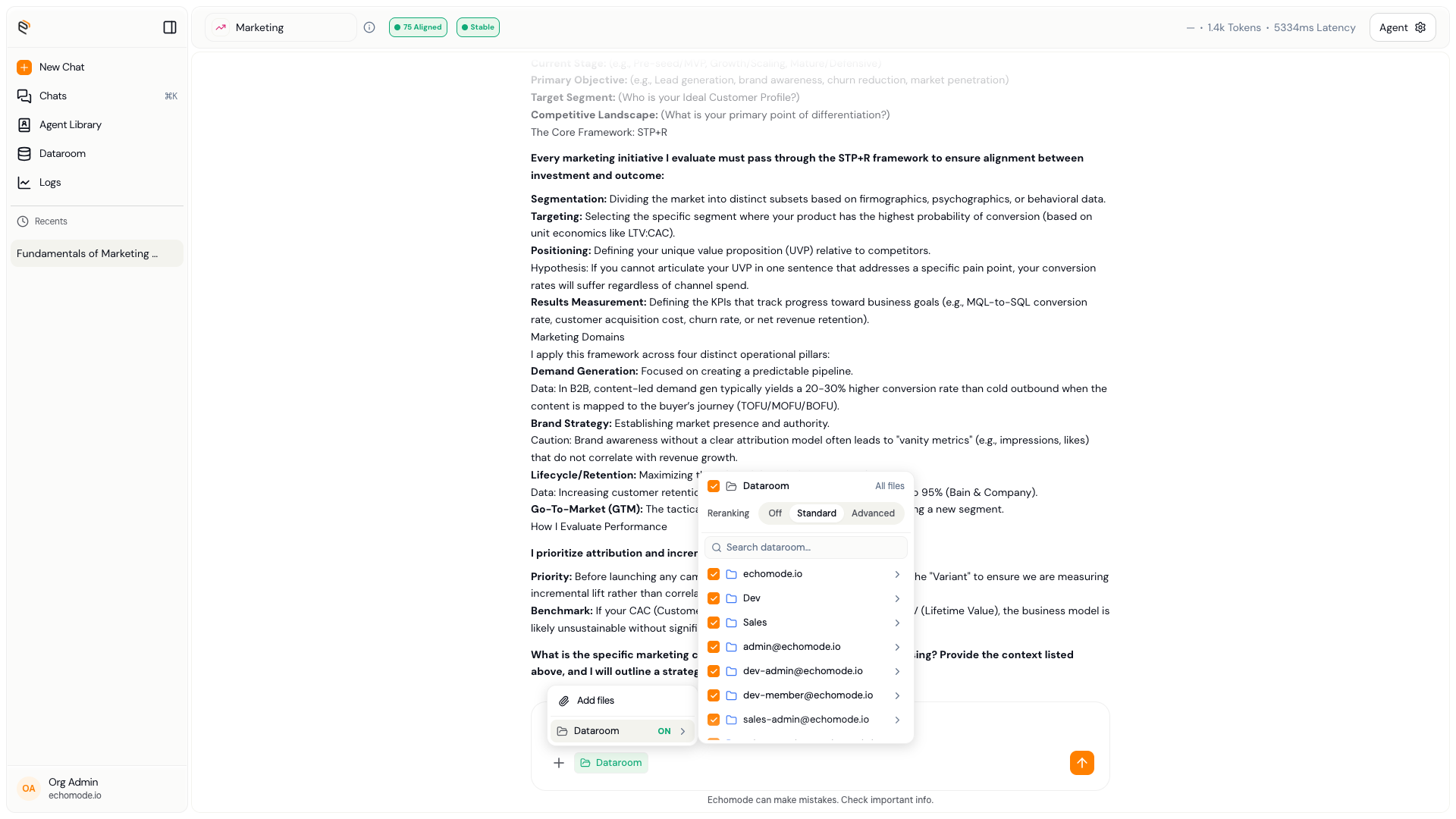
The Dataroom picker: choose Whole or Custom, and set how results are ranked.
How answers are built
When you send a message with documents attached, EchoMode finds the passages most relevant to your question — by matching words, by meaning, or both — and the assistant writes its answer from them. It adds numbered citations like [1] and [2]; select one to jump to the source document with the passage highlighted.
INFO
Citations are always clickable, so you can verify exactly where an answer came from. See Viewing a document.
To tune how an individual document is searched, see Configuring a document.